

We all want Google’s attention on our business, but as service providers, you don’t just want more people finding your website.
You want to show up in front of the people who are actively searching for what you do.
Those are the people typing things like “virtual assistant for coaches,” “Los Angeles wedding photographer,” or “business coach for designers” into Google because they’re already looking for a solution.
And THAT is where SEO comes in.
SEO, or search engine optimization, helps search engines understand what your website is about so they know when your pages are relevant to someone’s search. Google itself describes SEO as helping search engines understand your content while helping people find your site through search.
That does not mean sprinkling keywords everywhere and praying to the Google gods your dream clients find you.
A solid SEO foundation comes from making your website clear, useful, organized, and easy for both humans and search engines to understand.
So if you’re trying to improve your website SEO without turning into a full-time SEO specialist, start with these dos and don’ts 👇🏽
Do: Use the right keywords for your business
Keyword research is basically figuring out how your people are already searching for what you do.
And I mean how they actually search – not the fancy industry language you use behind the scenes. Because if someone needs a virtual assistant, they’re probably searching something related to “virtual assistant,” not “your right-hand business bestie.”
Don’t come for me, I too like to refer to myself as “Your Site Chick”, but using that as a target keyword will never get me found by my target audience (or anyone for that matter, let’s BFFR).
This is where keyword research tools come in.
Keysearch is a great budget-friendly option, especially when you’re starting to research keywords for your website and blogs. Use my affiliate link and get 30% off your first month here by using the code: GUAPA
If SEO and content are becoming a bigger part of your marketing strategy, Semrush is a much bigger investment but gives you significantly more data and research tools to work with.
If you want a few more tools in your SEO toolbox, I also rounded up my favorite Chrome extensions for SEO and website optimization.
Don’t: Waste your headlines on generic copy
I love non-boring copy as much as the next person. You are talking to someone who specializes in creating personality-packed websites. I am obviously pro-personality.
But CLEAR website copy will always perform better for humans and for bots.
Headlines like:
Welcome to My Website
About Me
Your Business Bestie
…might sound fun but doesn’t give any valuable context about what the page is actually about. That’s the type of copy that can be used decoratively, like a marquee or a banner that introduces a section, but should NOT be used as the actual headings.
Your H2s and H3 headings should help organize the page and give someone enough context that they can skim through it and still understand what you do, what you’re talking about, and where they are on the page.
The priority is making it make sense to anybody who comes across your website, even if they’ve never heard of you, what you do, or the transformation you provide.
Do: Put your target keyword in your H1
Your H1 is the main headline of the page. It’s thee label telling your visitor, “THIS is what this page is about.”
Your H1 should clearly describe the page and, ideally, connect with the search language you uncovered during your keyword research.
For example, some H1 keyword examples for a homepage could be:
“Virtual Assistants for Coaches”
“Nail Tech in Long Beach”
Keep ONE H1 tagged per page so there’s one clear main heading that establishes what the page is about. Then use your H2s and H3s to organize everything underneath it.
Do: Use your headings in the right order
We already talked about making your headlines clear. Now we need to talk about the structure underneath them.
H1, H2, H3, paragraph text.
These heading structures are important because they tell browsers, search engines, and assistive technology how your content is organized.
Your H1 is the page topic (one per page).
Your H2s break that topic into the main sections.
Your H3s live underneath an H2 when you need to break one of those sections down even further.
So you want something that looks more like:
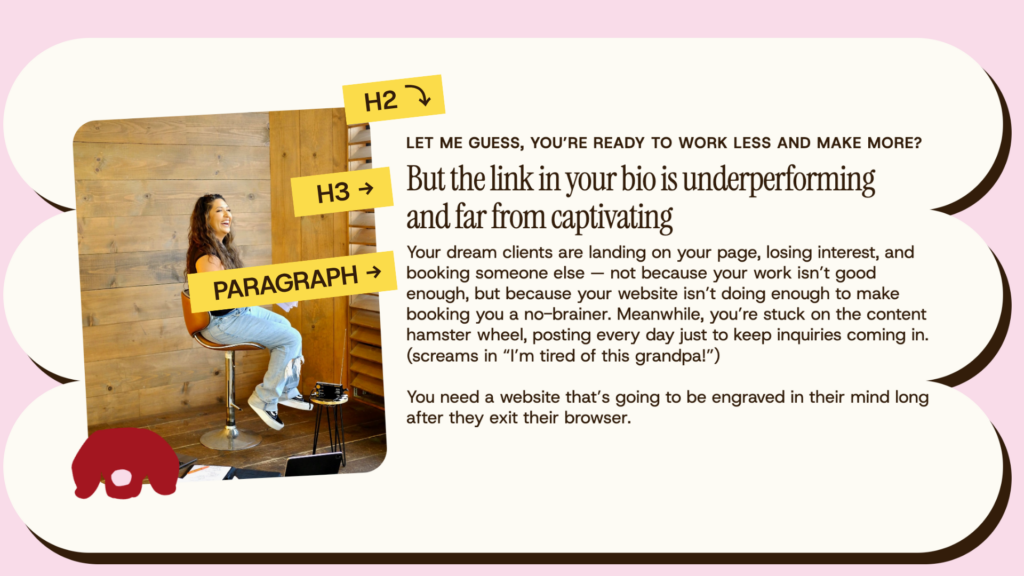
Following the right heading order makes your content easier for people to scan and helps search engines understand how everything on the page is organized.
And that scanning part matters. People are skimmers, and not everyone is sitting there reading every single line of text.
Clear headings let them jump around, find what matters to them, and understand the page without working too hard for it.
Don’t: Let AI write your entire website copy
We need to clear this one up because there is a LOT of misleading information floating around about AI and SEO.
Google does not have a blanket rule that says:
AI wrote it = bad SEO
Google cares about whether your content is accurate, useful, relevant, original, and actually created for people, not whether AI touched it.
You could use AI as a tool.
Use it to organize your thoughts, help you research, clean up something you already wrote, brainstorm an outline, or tell if you that paragraph you’ve reread 47 times makes absolutely no fucking sense.
But your expertise, opinions, examples, stories, client knowledge, and actual experience still need to show up throughout your website. Otherwise, you risk publishing the exact same watered-down information 500 others in your industry also copied from an AI bot.
And that’s not just boring for humans. Google’s own SEO guidance encourages original, useful, people-first content rather than simply rehashing what already exists online.
Following the right heading order makes your content easier for people to scan and helps search engines understand how everything on the page is organized.
And that scanning part matters. People are skimmers, and not everyone is sitting there reading every single line of text.
Clear headings let them jump around, find what matters to them, and understand the page without working too hard for it.
Do: Optimize the media on your website
Images and other media can become some of the heaviest parts of a webpage, which means unnecessarily huge files can contribute to slower loading. Google specifically recommends optimizing images for both speed and quality.
Before uploading images to your website:
Compress the file size, and give the file a relavant and descriptive name instead of leaving it as something like IMG_483729.jpg.
I use tools like PixResize when I need to rename and compress a large bulk of images (plus it’s free 👀). If you’re uploading videos or GIFs, compress those too.
Don’t: Skip accessibility when optimizing your images
SEO and accessibility overlap here, but accessibility comes first.
Alt text, short for alternative text, describes meaningful images for people who can’t see them or are using assistive technology such as screen readers.
Google can also use alt text, along with the surrounding page content and its image-understanding technology, to understand what an image is about.
So if the image actually communicates something important, give it useful alt text.
For example:
Bad:
woman business coach entrepreneur coach coaching business business coach
Better:
Business coach reviewing a client strategy document on her laptop
If a relevant keyword happens to belong in the description naturally, cool.
But DO NOT turn every image into an excuse to stuff your keywords into the description.
Google specifically warns against stuffing keywords into alt text because it creates a shitty experience for the user and comes off as spammy.
Do: Set up Google Search Console and Google Analytics
Google Search Console helps you see how your website is performing in Google Search. You can check whether your pages are showing up in Google, inspect individual pages, see what searches are bringing people to your site, and submit your sitemap.
Google says most websites are discovered automatically, so submitting a sitemap does not magically make you rank. It gives Google another way to discover the pages on your website.
Google Analytics helps you understand what people do once they get to your site.
Set up both. I take care of this for all of my clients so they’re set up from the start! I also include resources on getting this done for all of my website template clients so they’re covered too.
Otherwise, you’re doing SEO with absolutely no idea whether people are finding you, which pages they’re landing on, or what happens after they arrive.
Looking at your actual data is how you figure out what’s working, what isn’t, and what needs your attention.
Do: Give every page a clear SEO focus
Every page on your website should have a job, and it should be clear what the page is actually about.
Give the page a clear topic, understand the search intent behind that topic, and create content that actually satisfies it.
If you want to go deeper into what each website page should actually be doing, I have a full breakdown of the important website pages you might be missing on your website and another guide on the goal of core pages every service provider should have.
Don’t: Skip your SEO title and meta description
Your SEO title and meta description help shape how your page appears in search results.
Your SEO title should clearly describe the page and give people a reason to click.
Keep titles descriptive and concise and fit ~50-60 characters.
Your meta description is the short description underneath the title in search results that provides more context for what is in that page.
Keep it ~150-160 characters per description, incorporate your focus keyword, make it specific to the page, and writing it like something that should actually earn the click.
Each important page on your website should have its own SEO title and meta description.
SEO works best when you give it time to work
SEO is slow.
You can make all the right updates today and still not rank #1 on Google by tomorrow morning with seventeen inquiries waiting in your inbox.
Google says changes can take anywhere from hours to several months to be reflected in search, and it generally recommends giving updates a month or two before deciding whether it had an impact.
That’s why I don’t look at SEO as one big task you finish once.
You build the foundation, publish useful content, pay attention to what is actually bringing people to your site, update what needs improvement, rinse, and repeat.
The goal is to make it easier for Google to understand your website, easier for the right people to find you, and easier for those people to understand why they should stick around once they land there.
Get your website SEO ready before you launch
If you’re looking at this and you know you need a new website, start with my free Website Prep Workbook first.
It helps service providers figure out the moving pieces before design day, including your pages, copy, branding, photos, SEO, and launch details, so you’re not trying to make all of those decisions while simultaneously building the damn thing.
Get the Free Website Launch Prep Workbook →
Want website tips like this in your inbox?
Every week inside Cali Girl Chronicles, I break down website strategy, copy, SEO, and the little tweaks that help more people find you, understand what you do, and take action. It’s for service providers who want more from their website without having to become a web designer or SEO expert themselves.
Join Cali Girl Chronicles →


Your website should help you stand out — and building fun, interactive sites for founders who’ve already made something for themselves, is what EYE do! Because the whole point of your site is to get your dream clients to act and see that you’re THEE person for them, that’s what I’m here to help you do. But things won’t move until you do…
(or, at least, that’s what my clients say)
The designer you wish you had found sooner
Hola, I'm Joyce!

This notion workbook helps you map out exactly what your website needs — before you start building. The website game plan was created to help you lay out everything you need from branding to copy to website must-haves. So you can stop second guessing and start building with confidence.
Prep for your website build without all the “omg am I missing something?” overwhelm
THE WEBSITE GAME PLAN

Every Wednesday, get my completely unfiltered 2 cents on the wins, the fuckups, and everything in between, from a Latina solopreneur figuring it out as she goes, too.
Serving you business (not) as usual

